 150bb3e3a0
* feat: auto-discover and persist Git Bash path on Windows - Add autoDiscoverGitBash function to find and cache Git Bash path when needed - Modify System_CheckGitBash IPC handler to auto-discover and persist path - Update Claude Code service with fallback auto-discovery mechanism - Git Bash path is now cached after first discovery, improving UX for Windows users * udpate * fix: remove redundant validation of auto-discovered Git Bash path The autoDiscoverGitBash function already returns a validated path, so calling validateGitBashPath again is unnecessary. Co-Authored-By: Claude <noreply@anthropic.com> * udpate * test: add unit tests for autoDiscoverGitBash function Add comprehensive test coverage for autoDiscoverGitBash including: - Discovery with no existing config path - Validation of existing config paths - Handling of invalid existing paths - Config persistence verification - Real-world scenarios (standard Git, portable Git, user-configured paths) Co-Authored-By: Claude <noreply@anthropic.com> * fix: remove unnecessary async keyword from System_CheckGitBash handler The handler doesn't use await since autoDiscoverGitBash is synchronous. Removes async for consistency with other IPC handlers. 🤖 Generated with [Claude Code](https://claude.com/claude-code) Co-Authored-By: Claude <noreply@anthropic.com> * fix: rename misleading test to match actual behavior Renamed "should not call configManager.set multiple times on single discovery" to "should persist on each discovery when config remains undefined" to accurately describe that each call to autoDiscoverGitBash persists when the config mock returns undefined. 🤖 Generated with [Claude Code](https://claude.com/claude-code) Co-Authored-By: Claude <noreply@anthropic.com> * refactor: use generic type parameter instead of type assertion Replace `as string | undefined` with `get<string | undefined>()` for better type safety when retrieving GitBashPath from config. 🤖 Generated with [Claude Code](https://claude.com/claude-code) Co-Authored-By: Claude <noreply@anthropic.com> * refactor: simplify Git Bash path resolution in Claude Code service Remove redundant validateGitBashPath call since autoDiscoverGitBash already handles validation of configured paths before attempting discovery. Also remove unused ConfigKeys and configManager imports. 🤖 Generated with [Claude Code](https://claude.com/claude-code) Co-Authored-By: Claude <noreply@anthropic.com> * fix: attempt auto-discovery when configured Git Bash path is invalid Previously, if a user had an invalid configured path (e.g., Git was moved or uninstalled), autoDiscoverGitBash would return null without attempting to find a valid installation. Now it logs a warning and attempts auto-discovery, providing a better user experience by automatically fixing invalid configurations. 🤖 Generated with [Claude Code](https://claude.com/claude-code) Co-Authored-By: Claude <noreply@anthropic.com> * fix: ensure CLAUDE_CODE_GIT_BASH_PATH env var takes precedence over config Previously, if a valid config path existed, the environment variable CLAUDE_CODE_GIT_BASH_PATH was never checked. Now the precedence order is: 1. CLAUDE_CODE_GIT_BASH_PATH env var (highest - runtime override) 2. Configured path from settings 3. Auto-discovery via findGitBash This allows users to temporarily override the configured path without modifying their persistent settings. 🤖 Generated with [Claude Code](https://claude.com/claude-code) Co-Authored-By: Claude <noreply@anthropic.com> * refactor: improve code quality and test robustness - Remove duplicate logging in Claude Code service (autoDiscoverGitBash logs internally) - Simplify Git Bash path initialization with ternary expression - Add afterEach cleanup to restore original env vars in tests - Extract mockExistingPaths helper to reduce test code duplication 🤖 Generated with [Claude Code](https://claude.com/claude-code) Co-Authored-By: Claude Opus 4.5 <noreply@anthropic.com> * feat: track Git Bash path source to distinguish manual vs auto-discovered - Add GitBashPathSource type and GitBashPathInfo interface to shared constants - Add GitBashPathSource config key to persist path origin ('manual' | 'auto') - Update autoDiscoverGitBash to mark discovered paths as 'auto' - Update setGitBashPath IPC to mark user-set paths as 'manual' - Add getGitBashPathInfo API to retrieve path with source info - Update AgentModal UI to show different text based on source: - Manual: "Using custom path" with clear button - Auto: "Auto-discovered" without clear button 🤖 Generated with [Claude Code](https://claude.com/claude-code) Co-Authored-By: Claude Opus 4.5 <noreply@anthropic.com> * refactor: simplify Git Bash config UI as form field - Replace large Alert components with compact form field - Use static isWin constant instead of async platform detection - Show Git Bash field only on Windows with auto-fill support - Disable save button when Git Bash path is missing on Windows - Add "Auto-discovered" hint for auto-detected paths - Remove hasGitBash state, simplify checkGitBash logic 🤖 Generated with [Claude Code](https://claude.com/claude-code) Co-Authored-By: Claude Opus 4.5 <noreply@anthropic.com> * ui: add explicit select button for Git Bash path Replace click-on-input interaction with a dedicated "Select" button for clearer UX 🤖 Generated with [Claude Code](https://claude.com/claude-code) Co-Authored-By: Claude Opus 4.5 <noreply@anthropic.com> * refactor: simplify Git Bash UI by removing clear button - Remove handleClearGitBash function (no longer needed) - Remove clear button from UI (auto-discover fills value, user can re-select) - Remove auto-discovered hint (SourceHint) - Remove unused SourceHint styled component 🤖 Generated with [Claude Code](https://claude.com/claude-code) Co-Authored-By: Claude <noreply@anthropic.com> * feat: add reset button to restore auto-discovered Git Bash path - Add handleResetGitBash to clear manual setting and re-run auto-discovery - Show "Reset" button only when source is 'manual' - Show "Auto-discovered" hint when path was found automatically - User can re-select if auto-discovered path is not suitable 🤖 Generated with [Claude Code](https://claude.com/claude-code) Co-Authored-By: Claude <noreply@anthropic.com> * fix: re-run auto-discovery when resetting Git Bash path When setGitBashPath(null) is called (reset), now automatically re-runs autoDiscoverGitBash() to restore the auto-discovered path. 🤖 Generated with [Claude Code](https://claude.com/claude-code) Co-Authored-By: Claude <noreply@anthropic.com> * feat(i18n): add Git Bash config translations Add translations for: - autoDiscoveredHint: hint text for auto-discovered paths - placeholder: input placeholder for bash.exe selection - tooltip: help tooltip text - error.required: validation error message Supported languages: en-US, zh-CN, zh-TW 🤖 Generated with [Claude Code](https://claude.com/claude-code) Co-Authored-By: Claude <noreply@anthropic.com> * update i18n * fix: auto-discover Git Bash when getting path info When getGitBashPathInfo() is called and no path is configured, automatically trigger autoDiscoverGitBash() first. This handles the upgrade scenario from old versions that don't have Git Bash path configured. 🤖 Generated with [Claude Code](https://claude.com/claude-code) Co-Authored-By: Claude <noreply@anthropic.com> --------- Co-authored-by: Claude <noreply@anthropic.com> |
||
|---|---|---|
| .github | ||
| .husky | ||
| .vscode | ||
| .yarn | ||
| build | ||
| config | ||
| docs | ||
| packages | ||
| resources | ||
| scripts | ||
| src | ||
| tests | ||
| .editorconfig | ||
| .env.example | ||
| .git-blame-ignore-revs | ||
| .gitattributes | ||
| .gitignore | ||
| .npmrc | ||
| .oxlintrc.json | ||
| .yarnrc.yml | ||
| AGENTS.md | ||
| app-upgrade-config.json | ||
| biome.jsonc | ||
| CLAUDE.md | ||
| CODE_OF_CONDUCT.md | ||
| CONTRIBUTING.md | ||
| dev-app-update.yml | ||
| electron-builder.yml | ||
| electron.vite.config.ts | ||
| eslint.config.mjs | ||
| LICENSE | ||
| package.json | ||
| playwright.config.ts | ||
| README.md | ||
| SECURITY.md | ||
| tsconfig.json | ||
| tsconfig.node.json | ||
| tsconfig.web.json | ||
| vitest.config.ts | ||
| yarn.lock | ||

English | 中文 | Official Site | Documents | Development | Feedback












🍒 Cherry Studio
Cherry Studio is a desktop client that supports multiple LLM providers, available on Windows, Mac and Linux.
👏 Join Telegram Group|Discord | QQ Group(575014769)
❤️ Like Cherry Studio? Give it a star 🌟 or Sponsor to support the development!
🌠 Screenshot
🌟 Key Features
- Diverse LLM Provider Support:
- ☁️ Major LLM Cloud Services: OpenAI, Gemini, Anthropic, and more
- 🔗 AI Web Service Integration: Claude, Perplexity, Poe, and others
- 💻 Local Model Support with Ollama, LM Studio
- AI Assistants & Conversations:
- 📚 300+ Pre-configured AI Assistants
- 🤖 Custom Assistant Creation
- 💬 Multi-model Simultaneous Conversations
- Document & Data Processing:
- 📄 Supports Text, Images, Office, PDF, and more
- ☁️ WebDAV File Management and Backup
- 📊 Mermaid Chart Visualization
- 💻 Code Syntax Highlighting
- Practical Tools Integration:
- 🔍 Global Search Functionality
- 📝 Topic Management System
- 🔤 AI-powered Translation
- 🎯 Drag-and-drop Sorting
- 🔌 Mini Program Support
- ⚙️ MCP(Model Context Protocol) Server
- Enhanced User Experience:
- 🖥️ Cross-platform Support for Windows, Mac, and Linux
- 📦 Ready to Use - No Environment Setup Required
- 🎨 Light/Dark Themes and Transparent Window
- 📝 Complete Markdown Rendering
- 🤲 Easy Content Sharing
📝 Roadmap
We're actively working on the following features and improvements:
- 🎯 Core Features
- Selection Assistant with smart content selection enhancement
- Deep Research with advanced research capabilities
- Memory System with global context awareness
- Document Preprocessing with improved document handling
- MCP Marketplace for Model Context Protocol ecosystem
- 🗂 Knowledge Management
- Notes and Collections
- Dynamic Canvas visualization
- OCR capabilities
- TTS (Text-to-Speech) support
- 📱 Platform Support
- HarmonyOS Edition (PC)
- Android App (Phase 1)
- iOS App (Phase 1)
- Multi-Window support
- Window Pinning functionality
- Intel AI PC (Core Ultra) Support
- 🔌 Advanced Features
- Plugin System
- ASR (Automatic Speech Recognition)
- Assistant and Topic Interaction Refactoring
Track our progress and contribute on our project board.
Want to influence our roadmap? Join our GitHub Discussions to share your ideas and feedback!
🌈 Theme
- Theme Gallery: https://cherrycss.com
- Aero Theme: https://github.com/hakadao/CherryStudio-Aero
- PaperMaterial Theme: https://github.com/rainoffallingstar/CherryStudio-PaperMaterial
- Claude dynamic-style: https://github.com/bjl101501/CherryStudio-Claudestyle-dynamic
- Maple Neon Theme: https://github.com/BoningtonChen/CherryStudio_themes
Welcome PR for more themes
🤝 Contributing
We welcome contributions to Cherry Studio! Here are some ways you can contribute:
- Contribute Code: Develop new features or optimize existing code.
- Fix Bugs: Submit fixes for any bugs you find.
- Maintain Issues: Help manage GitHub issues.
- Product Design: Participate in design discussions.
- Write Documentation: Improve user manuals and guides.
- Community Engagement: Join discussions and help users.
- Promote Usage: Spread the word about Cherry Studio.
Refer to the Branching Strategy for contribution guidelines
Getting Started
- Fork the Repository: Fork and clone it to your local machine.
- Create a Branch: For your changes.
- Submit Changes: Commit and push your changes.
- Open a Pull Request: Describe your changes and reasons.
For more detailed guidelines, please refer to our Contributing Guide.
Thank you for your support and contributions!
🔧 Developer Co-creation Program
We are launching the Cherry Studio Developer Co-creation Program to foster a healthy and positive-feedback loop within the open-source ecosystem. We believe that great software is built collaboratively, and every merged pull request breathes new life into the project.
We sincerely invite you to join our ranks of contributors and shape the future of Cherry Studio with us.
Contributor Rewards Program
To give back to our core contributors and create a virtuous cycle, we have established the following long-term incentive plan.
The inaugural tracking period for this program will be Q3 2025 (July, August, September). Rewards for this cycle will be distributed on October 1st.
Within any tracking period (e.g., July 1st to September 30th for the first cycle), any developer who contributes more than 30 meaningful commits to any of Cherry Studio's open-source projects on GitHub will be eligible for the following benefits:
- Cursor Subscription Sponsorship: Receive a $70 USD credit or reimbursement for your Cursor subscription, making AI your most efficient coding partner.
- Unlimited Model Access: Get unlimited API calls for the DeepSeek and Qwen models.
- Cutting-Edge Tech Access: Enjoy occasional perks, including API access to models like Claude, Gemini, and OpenAI, keeping you at the forefront of technology.
Growing Together & Future Plans
A vibrant community is the driving force behind any sustainable open-source project. As Cherry Studio grows, so will our rewards program. We are committed to continuously aligning our benefits with the best-in-class tools and resources in the industry. This ensures our core contributors receive meaningful support, creating a positive cycle where developers, the community, and the project grow together.
Moving forward, the project will also embrace an increasingly open stance to give back to the entire open-source community.
How to Get Started?
We look forward to your first Pull Request!
You can start by exploring our repositories, picking up a good first issue, or proposing your own enhancements. Every commit is a testament to the spirit of open source.
Thank you for your interest and contributions.
Let's build together.
🏢 Enterprise Edition
Building on the Community Edition, we are proud to introduce Cherry Studio Enterprise Edition—a privately-deployable AI productivity and management platform designed for modern teams and enterprises.
The Enterprise Edition addresses core challenges in team collaboration by centralizing the management of AI resources, knowledge, and data. It empowers organizations to enhance efficiency, foster innovation, and ensure compliance, all while maintaining 100% control over their data in a secure environment.
Core Advantages
- Unified Model Management: Centrally integrate and manage various cloud-based LLMs (e.g., OpenAI, Anthropic, Google Gemini) and locally deployed private models. Employees can use them out-of-the-box without individual configuration.
- Enterprise-Grade Knowledge Base: Build, manage, and share team-wide knowledge bases. Ensures knowledge retention and consistency, enabling team members to interact with AI based on unified and accurate information.
- Fine-Grained Access Control: Easily manage employee accounts and assign role-based permissions for different models, knowledge bases, and features through a unified admin backend.
- Fully Private Deployment: Deploy the entire backend service on your on-premises servers or private cloud, ensuring your data remains 100% private and under your control to meet the strictest security and compliance standards.
- Reliable Backend Services: Provides stable API services and enterprise-grade data backup and recovery mechanisms to ensure business continuity.
✨ Online Demo
Version Comparison
| Feature | Community Edition | Enterprise Edition |
|---|---|---|
| Open Source | ✅ Yes | ⭕️ Partially released to customers |
| Cost | AGPL-3.0 License | Buyout / Subscription Fee |
| Admin Backend | — | ● Centralized Model Access ● Employee Management ● Shared Knowledge Base ● Access Control ● Data Backup |
| Server | — | ✅ Dedicated Private Deployment |
Get the Enterprise Edition
We believe the Enterprise Edition will become your team's AI productivity engine. If you are interested in Cherry Studio Enterprise Edition and would like to learn more, request a quote, or schedule a demo, please feel free to contact us.
- For Business Inquiries & Purchasing: 📧 bd@cherry-ai.com
🔗 Related Projects
-
new-api: The next-generation LLM gateway and AI asset management system supports multiple languages.
-
one-api: LLM API management and distribution system supporting mainstream models like OpenAI, Azure, and Anthropic. Features a unified API interface, suitable for key management and secondary distribution.
-
Poe: Poe gives you access to the best AI, all in one place. Explore GPT-5, Claude Opus 4.1, DeepSeek-R1, Veo 3, ElevenLabs, and millions of others.
-
ublacklist: Blocks specific sites from appearing in Google search results
🚀 Contributors
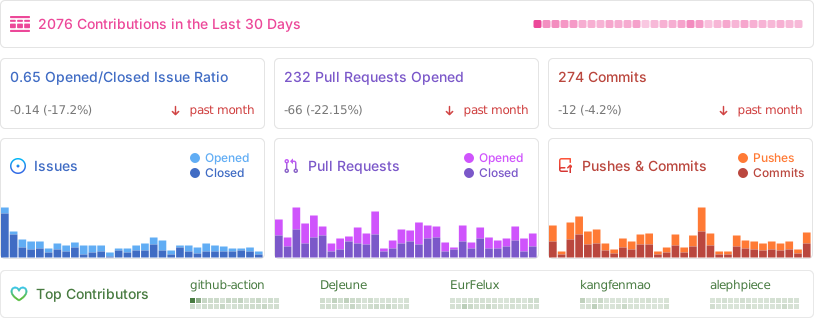
📊 GitHub Stats
⭐️ Star History
📜 License
The Cherry Studio Community Edition is governed by the standard GNU Affero General Public License v3.0 (AGPL-3.0), available at https://www.gnu.org/licenses/agpl-3.0.html.
Use of the Cherry Studio Community Edition for commercial purposes is permitted, subject to full compliance with the terms and conditions of the AGPL-3.0 license.
Should you require a commercial license that provides an exemption from the AGPL-3.0 requirements, please contact us at bd@cherry-ai.com.