 352ecbc506
* ✨ feat: add claude-code-templates via git submodule with build-time copy - Add git submodule for davila7/claude-code-templates - Create scripts/copy-templates.js to copy components at build time - Update package.json build script to include template copying - Add resources/data/components/ to .gitignore (generated files) Templates are now automatically synced from external repo to resources/data/components/ during build process, avoiding manual file copying. To update templates: git submodule update --remote --merge * fix: update target directory for copying Claude Code templates * ✨ feat: merge Anthropics skills into template sync * 📝 docs: add agent plugins management implementation spec Add comprehensive implementation plan for plugin management feature: - Security validation and transactional operations - Plugin browsing, installation, and management UI - IPC handlers and PluginService architecture - Metadata caching and database integration * ✨ feat: add plugin management backend infrastructure Backend implementation for Claude Code plugin management: - Add PluginService with security validation and caching - Create IPC handlers for plugin operations (list, install, uninstall) - Add markdown parser with safe YAML frontmatter parsing - Extend AgentConfiguration schema with installed_plugins field - Update preload bridge to expose plugin API to renderer - Add plugin types (PluginMetadata, PluginError, PluginResult) Features: - Transactional install/uninstall with rollback - Path traversal prevention and file validation - 5-minute plugin list caching for performance - SHA-256 content hashing for integrity checks - Duplicate plugin handling (auto-replace) Dependencies added: - gray-matter: Markdown frontmatter parsing - js-yaml: Safe YAML parsing with FAILSAFE_SCHEMA * ✨ feat: add plugin management UI and integration Complete frontend implementation for Claude Code plugin management: **React Hooks:** - useAvailablePlugins: Fetch and cache available plugins - useInstalledPlugins: List installed plugins with refresh - usePluginActions: Install/uninstall with loading states **UI Components (HeroUI):** - PluginCard: Display plugin with install/uninstall actions - CategoryFilter: Multi-select chip-based category filter - InstalledPluginsList: Table view with uninstall confirmation - PluginBrowser: Search, filter, pagination, responsive grid - PluginSettings: Main container with Available/Installed tabs **Integration:** - Added "Plugins" tab to AgentSettingsPopup - Full i18n support (English, Simplified Chinese, Traditional Chinese) - Toast notifications for success/error states - Loading skeletons and empty states **Features:** - Search plugins by name/description - Filter by category and type (agents/commands) - Pagination (12 items per page) - Install/uninstall with confirmation dialogs - Real-time plugin list updates - Responsive grid layout (1-3 columns) All code formatted with Biome and follows existing patterns. * 🐛 fix: add missing plugin i18n keys at root level Add plugin translation keys at root 'plugins.*' level to match component usage: - Search and filter UI strings - Pluralization support for result counts - Empty state messages - Action button labels - Confirmation dialog text Translations added for all three locales (en-US, zh-CN, zh-TW). * 🐛 fix: use getResourcePath() utility for plugin directory resolution Replace manual path calculation with getResourcePath() utility which correctly handles both development and production environments. This fixes the issue where plugins were not loading because __dirname was resolving to the wrong location. Fixes: - Plugins now load correctly in development mode - Path resolution consistent with other resource loading in the app - Removed unused 'app' import from electron * 🎨 fix: improve plugin UI scrolling and category filter layout Fixes two UI issues: 1. Enable scrolling for plugin list: - Changed overflow-hidden to overflow-y-auto on tab containers - Plugin grid now scrollable when content exceeds viewport 2. Make category filter more compact: - Added max-h-24 (96px) height limit to category chip container - Enabled vertical scrolling for category chips - Prevents category filter from taking too much vertical space UI improvements enhance usability when browsing large plugin collections. * 🎨 fix: ensure both agent and command badges have visible backgrounds Changed Chip variant from 'flat' to 'solid' for plugin type badges. This ensures both agent (primary) and command (secondary) badges display with consistent, visible background colors instead of command badges appearing as text-only. * ✨ feat: add plugin detail modal for viewing full plugin information Add modal to display complete plugin details when clicking on a card: Features: - Click any plugin card to view full details in a modal - Shows complete description (not truncated) - Displays all metadata: version, author, tools, allowed_tools, tags - Shows file info: filename, size, source path, install date - Install/uninstall actions available in modal - Hover effect on cards to indicate clickability - Button clicks don't trigger card click (event.stopPropagation) Components: - New PluginDetailModal component with scrollable content - Updated PluginCard to be clickable (isPressable) - Updated PluginBrowser to manage modal state UI improvements provide better plugin exploration and decision-making. * 🐛 fix: render plugin detail modal above agent settings modal Use React portal to render PluginDetailModal directly to document.body, ensuring it appears above the agent settings modal instead of being blocked by it. Changes: - Import createPortal from react-dom - Wrap modal content in createPortal(modalContent, document.body) - Add z-[9999] to modal wrapper for proper layering Fixes modal visibility issue where plugin details were hidden behind the parent agent settings modal. * ✨ feat: add plugin content viewing and editing in detail modal - Added IPC channels for reading and writing plugin content - Implemented readContent() and writeContent() methods in PluginService - Added IPC handlers for content operations with proper error handling - Exposed plugin content API through preload bridge - Updated PluginDetailModal to fetch and display markdown content - Added edit mode with textarea for modifying plugin content - Implemented save/cancel functionality with optimistic UI updates - Added agentId prop to component chain for write operations - Updated AgentConfigurationSchema to include all plugin metadata fields - Moved plugin types to shared @types for cross-process access - Added validation and security checks for content read/write - Updated content hash in DB after successful edits * 🐛 fix: change event handler from onPress to onClick for uninstall and install buttons * 📝 docs: update AI Assistant Guide to clarify proposal and commit guidelines * 📝 docs: add skills support extension spec for agent plugins management * ✨ feat: add secure file operation utilities for skills plugin system - Implement copyDirectoryRecursive() with security protections - Implement deleteDirectoryRecursive() with path validation - Implement getDirectorySize() for folder size calculation - Add path traversal protection using isPathInside() - Handle symlinks securely to prevent attacks - Add recursion depth limits to prevent stack overflow - Preserve file permissions during copy - Handle race conditions and missing files gracefully - Skip special files (pipes, sockets, devices) Security features: - Path validation against allowedBasePath boundary - Symlink detection and skip to prevent circular loops - Input validation for null/empty/relative paths - Comprehensive error handling and logging Updated spec status to "In Progress" and added implementation progress checklist. * ✨ feat: add skill type support and skill metadata parsing Type System Updates (plugin.ts): - Add PluginType export for 'agent' | 'command' | 'skill' - Update PluginMetadataSchema to include 'skill' in type enum - Update InstalledPluginSchema to support skill type - Update all option interfaces to support skill type - Add skills array to ListAvailablePluginsResult - Document filename semantics differences between types Markdown Parser Updates (markdownParser.ts): - Implement parseSkillMetadata() function for SKILL.md parsing - Add comprehensive input validation (absolute path check) - Add robust error handling with specific PluginErrors - Add try-catch around file operations and YAML parsing - Add type validation for frontmatter data fields - Add proper logging using loggerService - Handle getDirectorySize() failures gracefully - Document hash scope decision (SKILL.md only vs entire folder) - Use FAILSAFE_SCHEMA for safe YAML parsing Security improvements: - Path validation to ensure absolute paths - Differentiate ENOENT from permission errors - Type validation for all frontmatter fields - Safe YAML parsing to prevent deserialization attacks Updated spec progress tracking. * ✨ feat: implement complete skill support in PluginService Core Infrastructure: - Add imports for parseSkillMetadata and file operation utilities - Add PluginType to imports for type-safe handling Skill-Specific Methods: - sanitizeFolderName() - validates folder names (no dots allowed) - scanSkillDirectory() - scans skills/ for skill folders - installSkill() - copies folders with transaction/rollback - uninstallSkill() - removes folders with transaction/rollback Updated Methods for Skills Support: - listAvailable() - now scans and returns skills array - install() - branches on type to handle skills vs files - uninstall() - branches on type for skill/file handling - ensureClaudeDirectory() - handles 'skills' subdirectory - listInstalled() - validates skill folders on filesystem - writeContent() - updated signature to accept PluginType Key Implementation Details: - Skills use folder names WITHOUT extensions - Agents/commands use filenames WITH .md extension - Different sanitization rules for folders vs files - Transaction pattern with rollback for all operations - Comprehensive logging and error handling - Maintains backward compatibility with existing code Updated spec progress tracking. * ✨ feat: add skill support to frontend hooks and UI components Frontend Hooks (usePlugins.ts): - Add skills state to useAvailablePlugins hook - Return skills array in hook result - Update install() to accept 'skill' type - Update uninstall() to accept 'skill' type UI Components: - PluginCard: Add 'skill' type badge with success color - PluginBrowser: Add skills prop and include in plugin list - PluginBrowser: Update type definitions to include 'skill' - PluginBrowser: Include skills in tab filtering Complete frontend integration for skills plugin type. Updated spec progress tracking. * ♻️ refactor: remove unused variable in installSkill method * 📝 docs: mark implementation as complete with summary Implementation Status: COMPLETE (11/12 tasks) Completed: - ✅ File operation utilities with security protections - ✅ Skill metadata parsing with validation - ✅ Plugin type system updated to include 'skill' - ✅ PluginService skill methods (scan, install, uninstall) - ✅ PluginService updated for skill support - ✅ IPC handlers (no changes needed - already generic) - ✅ Frontend hooks updated for skills - ✅ UI components updated (PluginCard, PluginBrowser) - ✅ Build check passed with lint fixes Deferred (non-blocking): - ⏸️ Session integration - requires further investigation into session handler location and implementation The core skills plugin system is fully implemented and functional. Skills can be browsed, installed, and uninstalled through the UI. All security requirements met with path validation and transaction rollback. Code passes lint checks and follows project patterns. * 🐛 fix: pass skills prop to PluginBrowser component Fixed "skills is not iterable" error by: - Destructuring skills from useAvailablePlugins hook - Updating type annotations to include 'skill' type - Passing skills prop to PluginBrowser component This completes the missing UI wiring for skills support. * ✨ feat: add Skills tab to plugin browser Added missing Skills tab to PluginBrowser component: - Added Skills tab to type tabs - Added translations for skills in all locales (en-us, zh-cn, zh-tw) - English: "Skills" - Simplified Chinese: "技能" - Traditional Chinese: "技能" This completes the UI integration for the skills plugin type. * ✨ feat: add 'skill' type to AgentConfiguration and GetAgentSessionResponse schemas * ⬆️ chore: upgrade @anthropic-ai/claude-agent-sdk to v0.1.25 with patch - Updated from v0.1.1 to v0.1.25 - Applied fork/IPC patch to new version - Removed old patch file - All tests passing * 🐛 fix: resolve linting and TypeScript type errors in build check - Add external/** and resources/data/claude-code-plugins/** to lint ignore patterns to exclude git submodules and plugin templates from linting - Fix TypeScript error handling in IPC handlers by properly typing caught errors - Fix AgentConfiguration type mismatches by providing default values for permission_mode and max_turns when spreading configuration - Replace control character regex with String.fromCharCode() to avoid ESLint no-control-regex rule in sanitization functions - Fix markdownParser yaml.load return type by adding type assertion - Add getPluginErrorMessage helper to properly extract error messages from PluginError discriminated union types Main process TypeScript errors: Fixed (0 errors) Linting errors: Fixed (0 errors from 4397) Remaining: 4 renderer TypeScript errors in settings components * ♻️ refactor: improve plugin error handling and reorganize i18n structure * ⬆️ chore: update @anthropic-ai/claude-agent-sdk to include patch and additional dependencies * 🗑️ chore: remove unused Claude code plugins and related configurations - Deleted `.gitmodules` and associated submodules for `claude-code-templates` and `anthropics-skills`. - Updated `.gitignore`, `.oxlintrc.json`, and `eslint.config.mjs` to exclude `claude-code-plugins`. - Modified `package.json` to remove the build script dependency on copying templates. - Adjusted `PluginService.ts` to handle plugin paths without relying on removed resources. * format code * delete * delete * fix(i18n): Auto update translations for PR #10854 * ✨ feat: enhance PluginService and markdownParser with recursive skill directory search - Added `findAllSkillDirectories` function to recursively locate directories containing `SKILL.md`. - Updated `scanSkillDirectory` method in `PluginService` to utilize the new recursive search. - Modified `PluginDetailModal` to append `/SKILL.md` to the source path for skill plugins. * fix(i18n): Auto update translations for PR #10854 * remove specs * update claude code plugins files --------- Co-authored-by: suyao <sy20010504@gmail.com> Co-authored-by: beyondkmp <beyondkmp@gmail.com> Co-authored-by: GitHub Action <action@github.com> |
||
|---|---|---|
| .github | ||
| .husky | ||
| .vscode | ||
| .yarn | ||
| build | ||
| docs | ||
| packages | ||
| resources | ||
| scripts | ||
| src | ||
| tests | ||
| .editorconfig | ||
| .env.example | ||
| .git-blame-ignore-revs | ||
| .gitattributes | ||
| .gitignore | ||
| .npmrc | ||
| .oxlintrc.json | ||
| .yarnrc.yml | ||
| AGENTS.md | ||
| biome.jsonc | ||
| CLAUDE.md | ||
| CODE_OF_CONDUCT.md | ||
| components.json | ||
| CONTRIBUTING.md | ||
| dev-app-update.yml | ||
| electron-builder.yml | ||
| electron.vite.config.ts | ||
| eslint.config.mjs | ||
| LICENSE | ||
| package.json | ||
| playwright.config.ts | ||
| README.md | ||
| SECURITY.md | ||
| tsconfig.json | ||
| tsconfig.node.json | ||
| tsconfig.web.json | ||
| vitest.config.ts | ||
| yarn.lock | ||

English | 中文 | Official Site | Documents | Development | Feedback












🍒 Cherry Studio
Cherry Studio is a desktop client that supports multiple LLM providers, available on Windows, Mac and Linux.
👏 Join Telegram Group|Discord | QQ Group(575014769)
❤️ Like Cherry Studio? Give it a star 🌟 or Sponsor to support the development!
🌠 Screenshot
🌟 Key Features
- Diverse LLM Provider Support:
- ☁️ Major LLM Cloud Services: OpenAI, Gemini, Anthropic, and more
- 🔗 AI Web Service Integration: Claude, Perplexity, Poe, and others
- 💻 Local Model Support with Ollama, LM Studio
- AI Assistants & Conversations:
- 📚 300+ Pre-configured AI Assistants
- 🤖 Custom Assistant Creation
- 💬 Multi-model Simultaneous Conversations
- Document & Data Processing:
- 📄 Supports Text, Images, Office, PDF, and more
- ☁️ WebDAV File Management and Backup
- 📊 Mermaid Chart Visualization
- 💻 Code Syntax Highlighting
- Practical Tools Integration:
- 🔍 Global Search Functionality
- 📝 Topic Management System
- 🔤 AI-powered Translation
- 🎯 Drag-and-drop Sorting
- 🔌 Mini Program Support
- ⚙️ MCP(Model Context Protocol) Server
- Enhanced User Experience:
- 🖥️ Cross-platform Support for Windows, Mac, and Linux
- 📦 Ready to Use - No Environment Setup Required
- 🎨 Light/Dark Themes and Transparent Window
- 📝 Complete Markdown Rendering
- 🤲 Easy Content Sharing
📝 Roadmap
We're actively working on the following features and improvements:
- 🎯 Core Features
- Selection Assistant with smart content selection enhancement
- Deep Research with advanced research capabilities
- Memory System with global context awareness
- Document Preprocessing with improved document handling
- MCP Marketplace for Model Context Protocol ecosystem
- 🗂 Knowledge Management
- Notes and Collections
- Dynamic Canvas visualization
- OCR capabilities
- TTS (Text-to-Speech) support
- 📱 Platform Support
- HarmonyOS Edition (PC)
- Android App (Phase 1)
- iOS App (Phase 1)
- Multi-Window support
- Window Pinning functionality
- Intel AI PC (Core Ultra) Support
- 🔌 Advanced Features
- Plugin System
- ASR (Automatic Speech Recognition)
- Assistant and Topic Interaction Refactoring
Track our progress and contribute on our project board.
Want to influence our roadmap? Join our GitHub Discussions to share your ideas and feedback!
🌈 Theme
- Theme Gallery: https://cherrycss.com
- Aero Theme: https://github.com/hakadao/CherryStudio-Aero
- PaperMaterial Theme: https://github.com/rainoffallingstar/CherryStudio-PaperMaterial
- Claude dynamic-style: https://github.com/bjl101501/CherryStudio-Claudestyle-dynamic
- Maple Neon Theme: https://github.com/BoningtonChen/CherryStudio_themes
Welcome PR for more themes
🤝 Contributing
We welcome contributions to Cherry Studio! Here are some ways you can contribute:
- Contribute Code: Develop new features or optimize existing code.
- Fix Bugs: Submit fixes for any bugs you find.
- Maintain Issues: Help manage GitHub issues.
- Product Design: Participate in design discussions.
- Write Documentation: Improve user manuals and guides.
- Community Engagement: Join discussions and help users.
- Promote Usage: Spread the word about Cherry Studio.
Refer to the Branching Strategy for contribution guidelines
Getting Started
- Fork the Repository: Fork and clone it to your local machine.
- Create a Branch: For your changes.
- Submit Changes: Commit and push your changes.
- Open a Pull Request: Describe your changes and reasons.
For more detailed guidelines, please refer to our Contributing Guide.
Thank you for your support and contributions!
🔧 Developer Co-creation Program
We are launching the Cherry Studio Developer Co-creation Program to foster a healthy and positive-feedback loop within the open-source ecosystem. We believe that great software is built collaboratively, and every merged pull request breathes new life into the project.
We sincerely invite you to join our ranks of contributors and shape the future of Cherry Studio with us.
Contributor Rewards Program
To give back to our core contributors and create a virtuous cycle, we have established the following long-term incentive plan.
The inaugural tracking period for this program will be Q3 2025 (July, August, September). Rewards for this cycle will be distributed on October 1st.
Within any tracking period (e.g., July 1st to September 30th for the first cycle), any developer who contributes more than 30 meaningful commits to any of Cherry Studio's open-source projects on GitHub will be eligible for the following benefits:
- Cursor Subscription Sponsorship: Receive a $70 USD credit or reimbursement for your Cursor subscription, making AI your most efficient coding partner.
- Unlimited Model Access: Get unlimited API calls for the DeepSeek and Qwen models.
- Cutting-Edge Tech Access: Enjoy occasional perks, including API access to models like Claude, Gemini, and OpenAI, keeping you at the forefront of technology.
Growing Together & Future Plans
A vibrant community is the driving force behind any sustainable open-source project. As Cherry Studio grows, so will our rewards program. We are committed to continuously aligning our benefits with the best-in-class tools and resources in the industry. This ensures our core contributors receive meaningful support, creating a positive cycle where developers, the community, and the project grow together.
Moving forward, the project will also embrace an increasingly open stance to give back to the entire open-source community.
How to Get Started?
We look forward to your first Pull Request!
You can start by exploring our repositories, picking up a good first issue, or proposing your own enhancements. Every commit is a testament to the spirit of open source.
Thank you for your interest and contributions.
Let's build together.
🏢 Enterprise Edition
Building on the Community Edition, we are proud to introduce Cherry Studio Enterprise Edition—a privately-deployable AI productivity and management platform designed for modern teams and enterprises.
The Enterprise Edition addresses core challenges in team collaboration by centralizing the management of AI resources, knowledge, and data. It empowers organizations to enhance efficiency, foster innovation, and ensure compliance, all while maintaining 100% control over their data in a secure environment.
Core Advantages
- Unified Model Management: Centrally integrate and manage various cloud-based LLMs (e.g., OpenAI, Anthropic, Google Gemini) and locally deployed private models. Employees can use them out-of-the-box without individual configuration.
- Enterprise-Grade Knowledge Base: Build, manage, and share team-wide knowledge bases. Ensures knowledge retention and consistency, enabling team members to interact with AI based on unified and accurate information.
- Fine-Grained Access Control: Easily manage employee accounts and assign role-based permissions for different models, knowledge bases, and features through a unified admin backend.
- Fully Private Deployment: Deploy the entire backend service on your on-premises servers or private cloud, ensuring your data remains 100% private and under your control to meet the strictest security and compliance standards.
- Reliable Backend Services: Provides stable API services and enterprise-grade data backup and recovery mechanisms to ensure business continuity.
✨ Online Demo
🚧 Public Beta Notice
The Enterprise Edition is currently in its early public beta stage, and we are actively iterating and optimizing its features. We are aware that it may not be perfectly stable yet. If you encounter any issues or have valuable suggestions during your trial, we would be very grateful if you could contact us via email to provide feedback.
Version Comparison
| Feature | Community Edition | Enterprise Edition |
|---|---|---|
| Open Source | ✅ Yes | ⭕️ Partially released to customers |
| Cost | Free for Personal Use / Commercial License | Buyout / Subscription Fee |
| Admin Backend | — | ● Centralized Model Access ● Employee Management ● Shared Knowledge Base ● Access Control ● Data Backup |
| Server | — | ✅ Dedicated Private Deployment |
Get the Enterprise Edition
We believe the Enterprise Edition will become your team's AI productivity engine. If you are interested in Cherry Studio Enterprise Edition and would like to learn more, request a quote, or schedule a demo, please feel free to contact us.
- For Business Inquiries & Purchasing: 📧 bd@cherry-ai.com
🔗 Related Projects
-
one-api: LLM API management and distribution system supporting mainstream models like OpenAI, Azure, and Anthropic. Features a unified API interface, suitable for key management and secondary distribution.
-
ublacklist: Blocks specific sites from appearing in Google search results
🚀 Contributors
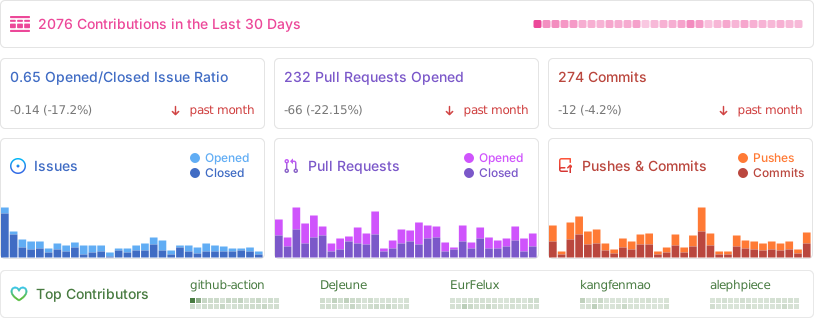
📊 GitHub Stats
⭐️ Star History
📜 License
The Cherry Studio Community Edition is governed by the standard GNU Affero General Public License v3.0 (AGPL-3.0), available at https://www.gnu.org/licenses/agpl-3.0.html.
Use of the Cherry Studio Community Edition for commercial purposes is permitted, subject to full compliance with the terms and conditions of the AGPL-3.0 license.
Should you require a commercial license that provides an exemption from the AGPL-3.0 requirements, please contact us at bd@cherry-ai.com.