d0cf3179a2
* refactor(translate): 将翻译设置组件抽离为独立文件 * refactor(translate): 统一变量名translateHistory为translateHistories * perf(translate): 翻译页面的输入处理性能优化 添加防抖函数来优化文本输入和键盘事件的处理,减少不必要的状态更新和翻译请求 * refactor(translate): 将输入区域组件抽离为独立文件 重构翻译页面,将输入区域相关逻辑和UI抽离到单独的InputArea组件中 优化代码结构,提高可维护性 buggy: waiting for merge * revert: 恢复main的translate page * refactor(translate): 缓存源语言状态 * refactor(translate): 提取翻译设置组件 将翻译设置功能提取为独立组件,减少主页面代码复杂度 * build: 添加 react-transition-group 及其类型定义依赖 * refactor(translate): 将翻译历史组件拆分为独立文件并优化布局结构 * refactor(translate): 调整翻译页面布局和样式 统一操作栏的padding样式,将输入和输出区域的容器样式分离以提高可维护性 * feat(翻译): 添加语言交换功能 添加源语言与目标语言交换功能按钮 为AWS Bedrock添加i18n * fix(自动翻译): 在翻译提示中添加去除前缀的说明 在翻译提示中添加说明,要求翻译时去除文本中的"[to be translated]"前缀 * feat(translate): 实现翻译历史列表的虚拟滚动以提高性能 添加虚拟列表组件并应用于翻译历史页面,优化长列表渲染性能 * refactor(translate): 移除未使用的InputArea组件 * feat(translate): 添加模型选择器到翻译页面并移除设置中的模型选择 将模型选择器从翻译设置移动到翻译页面主界面,优化模型选择流程 * style(translate): 为输出占位文本添加不可选中样式 * feat(翻译): 添加自定义语言支持 - 新增 CustomTranslateLanguage 类型定义 - 在数据库中增加 translate_languages 表和相关 CRUD 操作 - 实现自定义语言的添加、删除、更新和查询功能 * feat(翻译设置): 新增自定义语言管理和翻译模型配置功能 添加翻译设置页面,包含自定义语言表格、添加/编辑模态框、翻译模型选择和提示词配置 * feat(翻译设置): 实现自定义语言管理功能 添加自定义语言表格组件及模态框,支持增删改查操作 修复数据库字段命名不一致问题,将langcode改为langCode 新增内置语言代码列表用于校验 添加多语言支持及错误提示 * docs(TranslateService): 为自定义语言功能添加JSDoc注释 * feat(翻译): 添加获取所有翻译语言选项的功能 新增getTranslateOptions函数,用于合并内置翻译语言和自定义语言选项。当获取自定义语言失败时,自动回退到只返回内置语言选项。 * refactor(translate): 重构翻译功能代码,优化语言选项管理和类型定义 - 将翻译语言选项管理集中到useTranslate钩子中 - 修改LanguageCode类型为string以支持自定义语言 - 废弃旧的getLanguageByLangcode方法,提供新的实现 - 统一各组件对翻译语言选项的获取方式 - 优化类型定义,移除冗余类型TranslateLanguageVarious * refactor(translate): 重构翻译相关组件,提取LanguageSelect为独立组件并优化代码结构 * fix(AssistantService): 添加对未知目标语言的错误处理 当目标语言未知时抛出错误并记录日志,防止后续处理异常 * refactor(TranslateSettings): 重命名并重构自定义语言设置组件 将 CustomLanguageTable 重命名为 CustomLanguageSettings 并重构其实现 增加对自定义语言的增删改查功能 调整加载状态的高度以适应新组件 * style(settings): 调整设置页面布局样式以改善显示效果 移除重复的高度和padding设置,统一在内容容器中设置高度 * refactor(translate): 重命名变量 将 builtinTranslateLanguageOptions 重命名为 builtinLanguages 以提高代码可读性 更新相关引用以保持一致性 * refactor(TranslateSettings): 使用useCallback优化删除函数以避免不必要的重渲染 * feat(翻译设置): 为自定义语言设置添加标签本地化 为自定义语言设置中的"Value"和"langCode"字段添加中文标签 * style(TranslateSettings): 为SettingGroup添加flex样式以改善布局 * style(TranslateSettings): 表格样式调整 * docs(技术文档): 添加translate_languages表的技术文档 添加translate_languages表的技术说明文档,包含表结构、字段定义及业务约束说明 * feat(翻译): 添加对不支持语言的错误处理并规范化语言代码 - 在翻译服务中添加对不支持语言的错误提示 - 将自定义语言的langCode统一转为小写 - 完善QwenMT模型的语言映射表 * docs(messageUtils): 标记废弃的函数 * feat(消息工具): 添加通过ID查找翻译块的功能并优化翻译错误处理 添加findTranslationBlocksById函数通过消息ID从状态中查询翻译块 在翻译失败时清理无效的翻译块并显示错误提示 * fix(ApiService): 修复翻译请求错误处理逻辑 捕获翻译请求中的错误并通过onError回调传递,避免静默失败 * fix(translate): 调整双向翻译语言显示的最小宽度 * fix(translate): 修复语言交换条件判断逻辑 添加对双向翻译的限制检查,防止在双向翻译模式下错误交换语言 * feat(i18n): 添加翻译功能的自定义语言支持 * refactor(store): 将 targetLanguage 类型从 string 改为 LanguageCode * refactor(types): 将语言代码类型从字符串改为LanguageCode * refactor: 统一使用@logger导入loggerService 将项目中从@renderer/services/LoggerService导入loggerService的引用改为从@logger导入,以统一日志服务的引用方式 * refactor(translate): 移除旧的VirtualList组件并替换为DynamicVirtualList * refactor(translate): 移除未使用的useCallback导入 * refactor(useTranslate): 调整导入语句顺序以保持一致性 * fix(translate): 修复 useEffect 依赖项缺失问题 * refactor: 调整导入顺序 * refactor(i18n): 移除未使用的翻译字段并更新部分翻译内容 * fix(ApiService): 将completions方法替换为completionsForTrace以修复追踪问题 * refactor(TranslateSettings): 替换Spin组件为自定义加载图标 使用SvgSpinners180Ring替换antd的Spin组件以保持UI一致性 * refactor(TranslateSettings): 替换 HStack 为 Space 组件以优化布局 * style(TranslateSettings): 为删除按钮添加危险样式以提升视觉警示 * style(TranslateSettings): 移除表格容器中多余的justify-content属性 * fix(TranslateSettings): 添加默认emoji旗帜 * refactor(translate): 将语言映射函数移动到translate配置文件 将mapLanguageToQwenMTModel函数及相关映射表从utils模块移动到config/translate模块 * fix(translate): 修复couldTranslate语义错误 * docs(i18n): 更新日语翻译中的错误翻译 * refactor(translate): 将历史记录列表改为抽屉组件并优化样式 * fix(TranslateService): 修复添加自定义语言时缺少await的问题 * fix(TranslateService): 修复变量名错误,使用正确的langCode参数 在添加自定义语言时,错误地使用了value变量而非langCode参数,导致重复检查失效。修正为使用正确的参数名并更新相关错误信息。 * refactor(TranslateSettings): 使用函数式更新优化状态管理 * style(TranslatePromptSettings): 替换按钮为自定义样式组件 使用styled-components创建自定义ResetButton组件替换antd的Button 统一按钮样式与整体设计风格 * style(settings): 调整设置页面内边距从20px减少到10px * refactor(translate): 类型重命名 将Language更名为TranslateLanguage 将LanguageCode更名为TranslateLanguageCode * refactor(LanguageSelect): 提取默认语言渲染逻辑到独立函数 将重复的语言渲染逻辑提取为 defaultLanguageRenderer 函数,减少代码重复并提高可维护性 * refactor(TranslateSettings): 使用antd Form重构自定义语言模态框表单逻辑 重构自定义语言模态框,将原有的手动状态管理改为使用antd Form组件管理表单状态 表单验证逻辑整合到handleSubmit中,提高代码可维护性 修复emoji显示不同步的问题 * feat(翻译设置): 添加自定义语言表单的帮助文本和布局优化 为自定义语言表单的语言代码和语言名称字段添加帮助文本提示 重构表单布局,使用更合理的表单项排列方式 * refactor(TranslateSettings): 调整 CustomLanguageModal 中 EmojiPicker 的布局结构 * style(TranslateSettings): 调整自定义语言模态框按钮容器的内边距 * feat(翻译设置): 添加语言代码为空时的错误提示并优化表单验证 将表单验证逻辑从手动校验改为使用antd Form的rules属性 添加语言代码为空的错误提示信息 移除未使用的导入和日志代码 * feat(翻译设置): 改进自定义语言表单验证和错误处理 - 添加语言已存在的错误提示信息 - 使用国际化文本替换硬编码错误信息 - 重构表单布局,移除不必要的样式组件 - 增加语言代码存在性验证 - 改进表单标签和帮助信息的显示方式 * fix(i18n): 修正语言代码占位符的大小写格式 * style(translate): 移除设置页面中多余的翻译图标 * refactor(translate): 移动 OperationBar 样式并调整 LanguageSelect 宽度 将 OperationBar 样式从独立文件移至 TranslatePage 组件内 为 LanguageSelect 添加最小宽度并移除硬编码宽度 * refactor(设置页): 替换LanguageSelect为Selector组件以统一样式 * feat(翻译): 重构翻译功能并添加历史记录管理 将翻译相关逻辑从useTranslate钩子移动到TranslatePage组件 添加翻译历史记录的保存、删除和清空功能 在输入框底部显示预估token数量 * refactor(translate): 重构翻译页面代码结构并添加注释 将相关hooks和状态分组整理,添加清晰的注释说明各功能块作用 优化代码可读性和维护性 * refactor(TranslateService): 移除store依赖并优化错误处理 - 移除对store的依赖,直接使用getDefaultTranslateAssistant获取翻译助手 - 将翻译失败的错误消息从'failed'改为更明确的'empty' * feat(翻译): 优化翻译服务错误处理和错误信息展示 重构翻译服务逻辑,将错误处理和模型检查移至统一入口。添加翻译结果为空时的错误提示,并改进错误信息展示,包含具体错误原因。同时简化翻译页面调用逻辑,使用统一的翻译服务接口。 * style(translate): 为token计数添加右侧内边距以改善视觉间距 * refactor(translate): 移除useTranslate中未使用的状态并优化组件结构 将translatedContent和translating状态从useTranslate钩子中移除,改为在TranslatePage组件中直接使用redux状态 简化useTranslate的文档注释,仅保留核心功能描述 * refactor(LanguageSelect): 提取剩余props避免重复传递 避免将extraOptionsAfter等已解构的props再次传递给Select组件 * docs(i18n): 更新多语言翻译文件,添加缺失的翻译字段 * refactor(translate): 将历史记录操作移至TranslateService * style(LanguageSelect): 移除多余的 Space.Compact 包装 * fix(TranslateSettings): 修复编辑自定义语言时重复校验语言代码的问题 * refactor(translate): 调整翻译页面布局结构,优化操作栏样式 将输入输出区域整合为统一容器,调整操作栏宽度和间距 移动设置和历史按钮到输出操作栏,简化布局结构 * style(translate): 调整操作栏样式间距 * refactor(窗口): 将窗口最小尺寸常量提取到共享配置中 将硬编码的窗口最小宽度和高度值替换为从共享配置导入的常量,提高代码可维护性 * refactor(translate): 重构翻译页面操作栏布局 将操作栏从三个独立部分改为网格布局,使用InnerOperationBar组件统一样式 移除冗余的operationBarWidth变量,简化样式代码 * refactor(translate): 替换自定义复制按钮为原生按钮组件 移除自定义的CopyButton组件,直接使用Ant Design的原生Button组件来实现复制功能,保持UI一致性并减少冗余代码 * refactor(translate): 重构翻译页面操作栏布局 将操作按钮从左侧移动到右侧,并移除不必要的HStack组件 调整翻译按钮位置并保留其工具提示功能 * fix(translate): 修复语言选择器宽度不一致问题 为源语言和目标语言选择器添加统一的宽度样式,保持UI一致性 * feat(窗口): 添加获取窗口尺寸和监听窗口大小变化的功能 添加 Windows_GetSize IPC 通道用于获取窗口当前尺寸 添加 Windows_Resize IPC 通道用于监听窗口大小变化 新增 useWindowSize hook 方便在渲染进程中使用窗口尺寸 * feat(窗口大小): 优化窗口大小变化处理并添加响应式布局 使用debounce优化窗口大小变化的处理,避免频繁触发更新 为翻译页面添加响应式布局,根据窗口宽度和导航栏位置动态调整模型选择器宽度 * feat(WindowService): 添加窗口最大化/还原时的尺寸变化事件 在窗口最大化或还原时发送尺寸变化事件,以便界面可以响应这些状态变化 * refactor(hooks): 将窗口大小变化的日志级别从debug改为silly * feat(翻译配置): 添加对粤语的语言代码支持 为翻译配置添加对'zh-yue'语言代码的处理,返回对应的'Cantonese'值 * fix(TranslateSettings): 修复自定义语言模态框中语言代码重复校验问题 当编辑已存在的自定义语言时,如果输入的语言代码已存在且与原代码不同,则抛出错误提示 * fix: 修复拼写错误,将"Unkonwn"改为"Unknown" * fix(useTranslate): 添加加载状态检查防止未加载时返回错误数据 当翻译语言尚未加载完成时,返回UNKNOWN而非尝试查找语言 * feat(组件): 添加模型选择按钮组件用于选择模型 * refactor(translate): 重构翻译页面模型选择器和按钮布局 简化模型选择逻辑,移除未使用的代码和复杂样式计算 将ModelSelector替换为ModelSelectButton组件 将TranslateButton提取为独立组件 * refactor(hooks): 重命名并完善窗口尺寸钩子函数 将 useWindow.ts 重命名为 useWindowSize.ts 并添加详细注释 * docs(i18n): 修正语言代码标签的大小写 * style(TranslateSettings): 调整自定义语言模态框中表单标签的宽度 * fix(CustomLanguageModal): disable mask closing for the custom language modal * style: 调整组件间距和图标大小 优化 TranslatePage 内容容器的内边距和间距,并增大 ModelSelectButton 的图标尺寸 * style(translate): 调整翻译历史列表项高度和样式结构 重构翻译历史列表项的样式结构,将高度从120px增加到140px,并拆分样式组件以提高可维护性 * fix(translate): 点击翻译历史item后关闭drawer --------- Co-authored-by: suyao <sy20010504@gmail.com> |
||
|---|---|---|
| .github | ||
| .husky | ||
| .vscode | ||
| .yarn | ||
| build | ||
| docs | ||
| packages | ||
| resources | ||
| scripts | ||
| src | ||
| tests | ||
| .editorconfig | ||
| .env.example | ||
| .git-blame-ignore-revs | ||
| .gitattributes | ||
| .gitignore | ||
| .npmrc | ||
| .prettierignore | ||
| .prettierrc | ||
| .yarnrc.yml | ||
| CLAUDE.md | ||
| CODE_OF_CONDUCT.md | ||
| CONTRIBUTING.md | ||
| dev-app-update.yml | ||
| electron-builder.yml | ||
| electron.vite.config.ts | ||
| eslint.config.mjs | ||
| LICENSE | ||
| package.json | ||
| playwright.config.ts | ||
| README.md | ||
| SECURITY.md | ||
| tsconfig.json | ||
| tsconfig.node.json | ||
| tsconfig.web.json | ||
| vitest.config.ts | ||
| yarn.lock | ||

English | 中文 | Official Site | Documents | Development | Feedback












🍒 Cherry Studio
Cherry Studio is a desktop client that supports multiple LLM providers, available on Windows, Mac and Linux.
👏 Join Telegram Group|Discord | QQ Group(575014769)
❤️ Like Cherry Studio? Give it a star 🌟 or Sponsor to support the development!
🌠 Screenshot
🌟 Key Features
- Diverse LLM Provider Support:
- ☁️ Major LLM Cloud Services: OpenAI, Gemini, Anthropic, and more
- 🔗 AI Web Service Integration: Claude, Peplexity, Poe, and others
- 💻 Local Model Support with Ollama, LM Studio
- AI Assistants & Conversations:
- 📚 300+ Pre-configured AI Assistants
- 🤖 Custom Assistant Creation
- 💬 Multi-model Simultaneous Conversations
- Document & Data Processing:
- 📄 Supports Text, Images, Office, PDF, and more
- ☁️ WebDAV File Management and Backup
- 📊 Mermaid Chart Visualization
- 💻 Code Syntax Highlighting
- Practical Tools Integration:
- 🔍 Global Search Functionality
- 📝 Topic Management System
- 🔤 AI-powered Translation
- 🎯 Drag-and-drop Sorting
- 🔌 Mini Program Support
- ⚙️ MCP(Model Context Protocol) Server
- Enhanced User Experience:
- 🖥️ Cross-platform Support for Windows, Mac, and Linux
- 📦 Ready to Use - No Environment Setup Required
- 🎨 Light/Dark Themes and Transparent Window
- 📝 Complete Markdown Rendering
- 🤲 Easy Content Sharing
📝 Roadmap
We're actively working on the following features and improvements:
- 🎯 Core Features
- Selection Assistant with smart content selection enhancement
- Deep Research with advanced research capabilities
- Memory System with global context awareness
- Document Preprocessing with improved document handling
- MCP Marketplace for Model Context Protocol ecosystem
- 🗂 Knowledge Management
- Notes and Collections
- Dynamic Canvas visualization
- OCR capabilities
- TTS (Text-to-Speech) support
- 📱 Platform Support
- HarmonyOS Edition (PC)
- Android App (Phase 1)
- iOS App (Phase 1)
- Multi-Window support
- Window Pinning functionality
- 🔌 Advanced Features
- Plugin System
- ASR (Automatic Speech Recognition)
- Assistant and Topic Interaction Refactoring
Track our progress and contribute on our project board.
Want to influence our roadmap? Join our GitHub Discussions to share your ideas and feedback!
🌈 Theme
- Theme Gallery: https://cherrycss.com
- Aero Theme: https://github.com/hakadao/CherryStudio-Aero
- PaperMaterial Theme: https://github.com/rainoffallingstar/CherryStudio-PaperMaterial
- Claude dynamic-style: https://github.com/bjl101501/CherryStudio-Claudestyle-dynamic
- Maple Neon Theme: https://github.com/BoningtonChen/CherryStudio_themes
Welcome PR for more themes
🤝 Contributing
We welcome contributions to Cherry Studio! Here are some ways you can contribute:
- Contribute Code: Develop new features or optimize existing code.
- Fix Bugs: Submit fixes for any bugs you find.
- Maintain Issues: Help manage GitHub issues.
- Product Design: Participate in design discussions.
- Write Documentation: Improve user manuals and guides.
- Community Engagement: Join discussions and help users.
- Promote Usage: Spread the word about Cherry Studio.
Refer to the Branching Strategy for contribution guidelines
Getting Started
- Fork the Repository: Fork and clone it to your local machine.
- Create a Branch: For your changes.
- Submit Changes: Commit and push your changes.
- Open a Pull Request: Describe your changes and reasons.
For more detailed guidelines, please refer to our Contributing Guide.
Thank you for your support and contributions!
🔧 Developer Co-creation Program
We are launching the Cherry Studio Developer Co-creation Program to foster a healthy and positive-feedback loop within the open-source ecosystem. We believe that great software is built collaboratively, and every merged pull request breathes new life into the project.
We sincerely invite you to join our ranks of contributors and shape the future of Cherry Studio with us.
Contributor Rewards Program
To give back to our core contributors and create a virtuous cycle, we have established the following long-term incentive plan.
The inaugural tracking period for this program will be Q3 2025 (July, August, September). Rewards for this cycle will be distributed on October 1st.
Within any tracking period (e.g., July 1st to September 30th for the first cycle), any developer who contributes more than 30 meaningful commits to any of Cherry Studio's open-source projects on GitHub will be eligible for the following benefits:
- Cursor Subscription Sponsorship: Receive a $70 USD credit or reimbursement for your Cursor subscription, making AI your most efficient coding partner.
- Unlimited Model Access: Get unlimited API calls for the DeepSeek and Qwen models.
- Cutting-Edge Tech Access: Enjoy occasional perks, including API access to models like Claude, Gemini, and OpenAI, keeping you at the forefront of technology.
Growing Together & Future Plans
A vibrant community is the driving force behind any sustainable open-source project. As Cherry Studio grows, so will our rewards program. We are committed to continuously aligning our benefits with the best-in-class tools and resources in the industry. This ensures our core contributors receive meaningful support, creating a positive cycle where developers, the community, and the project grow together.
Moving forward, the project will also embrace an increasingly open stance to give back to the entire open-source community.
How to Get Started?
We look forward to your first Pull Request!
You can start by exploring our repositories, picking up a good first issue, or proposing your own enhancements. Every commit is a testament to the spirit of open source.
Thank you for your interest and contributions.
Let's build together.
🏢 Enterprise Edition
Building on the Community Edition, we are proud to introduce Cherry Studio Enterprise Edition—a privately-deployable AI productivity and management platform designed for modern teams and enterprises.
The Enterprise Edition addresses core challenges in team collaboration by centralizing the management of AI resources, knowledge, and data. It empowers organizations to enhance efficiency, foster innovation, and ensure compliance, all while maintaining 100% control over their data in a secure environment.
Core Advantages
- Unified Model Management: Centrally integrate and manage various cloud-based LLMs (e.g., OpenAI, Anthropic, Google Gemini) and locally deployed private models. Employees can use them out-of-the-box without individual configuration.
- Enterprise-Grade Knowledge Base: Build, manage, and share team-wide knowledge bases. Ensures knowledge retention and consistency, enabling team members to interact with AI based on unified and accurate information.
- Fine-Grained Access Control: Easily manage employee accounts and assign role-based permissions for different models, knowledge bases, and features through a unified admin backend.
- Fully Private Deployment: Deploy the entire backend service on your on-premises servers or private cloud, ensuring your data remains 100% private and under your control to meet the strictest security and compliance standards.
- Reliable Backend Services: Provides stable API services and enterprise-grade data backup and recovery mechanisms to ensure business continuity.
✨ Online Demo
🚧 Public Beta Notice
The Enterprise Edition is currently in its early public beta stage, and we are actively iterating and optimizing its features. We are aware that it may not be perfectly stable yet. If you encounter any issues or have valuable suggestions during your trial, we would be very grateful if you could contact us via email to provide feedback.
Version Comparison
| Feature | Community Edition | Enterprise Edition |
|---|---|---|
| Open Source | ✅ Yes | ⭕️ Partially released to customers |
| Cost | Free for Personal Use / Commercial License | Buyout / Subscription Fee |
| Admin Backend | — | ● Centralized Model Access ● Employee Management ● Shared Knowledge Base ● Access Control ● Data Backup |
| Server | — | ✅ Dedicated Private Deployment |
Get the Enterprise Edition
We believe the Enterprise Edition will become your team's AI productivity engine. If you are interested in Cherry Studio Enterprise Edition and would like to learn more, request a quote, or schedule a demo, please feel free to contact us.
- For Business Inquiries & Purchasing: 📧 bd@cherry-ai.com
🔗 Related Projects
-
one-api: LLM API management and distribution system supporting mainstream models like OpenAI, Azure, and Anthropic. Features a unified API interface, suitable for key management and secondary distribution.
-
ublacklist: Blocks specific sites from appearing in Google search results
🚀 Contributors
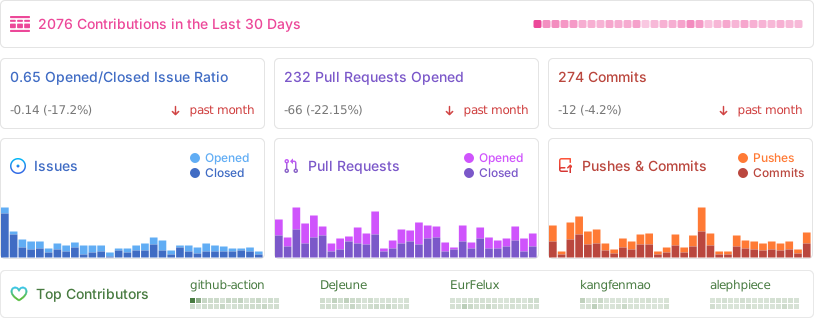
📊 GitHub Stats